
Apple Watch Competition Points Explained
Apple Watch competition points explained: the Move, Exercise, and Stand formula, daily 600-point cap, examples, and max-score strategy.
Last updated: Sep 3, 2026
Apple Watch competition points come from your Move, Exercise, and Stand ring percentages, not steps or distance. Each percent added to your rings earns one point, up to 600 points per day. Closing all three rings once gives 300 points; reaching 600 requires extra ring progress beyond 100%.
- Max points per day: 600
- Source: Move calories, Exercise minutes, Stand hours
- Bonus: going beyond ring goals
Practical tip: if you are trailing, focus on closing all three rings first. One missed ring can cost more than a long workout gains back.
Points summary: Daily points are the sum of your Move%, Exercise%, and Stand% progress, capped at 600 points/day.
Want to test a score? Use the Apple Watch competition points calculator.
- Points come from ring % progress (not steps).
- Each ring contributes points.
- Extra progress beyond goals can add points until the cap.
- Weekly winner = highest total after 7 days.
Trying to max out a day? Read how to get 600 points in an Apple Watch competition.
Apple Watch competition points formula
The short formula is:
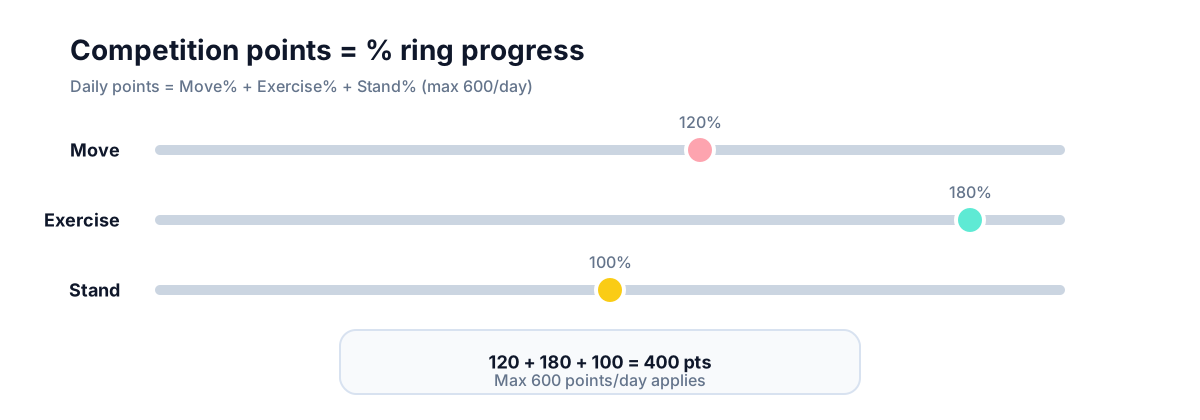
Move% + Exercise% + Stand% = daily competition points, capped at 600.
That means 100% + 100% + 100% = 300 points, not 600. Extra progress beyond your ring goals can add points until you hit the daily cap.
Quick daily points examples
| Move% | Exercise% | Stand% | Total points | Notes |
|---|---|---|---|---|
| 100 | 100 | 100 | 300 | All rings closed |
| 120 | 80 | 100 | 300 | Higher Move does not offset a low ring |
| 180 | 80 | 100 | 360 | Extra Move helps once all rings contribute |
| 200 | 200 | 120 | 600 | Daily cap applies |
Worked example (daily points)
| Day | Your progress % | Points earned | Notes |
|---|---|---|---|
| Mon | Move 120%, Exercise 100%, Stand 100% | 320 | Solid day, all rings closed |
| Tue | Move 180%, Exercise 80%, Stand 100% | 360 | More Move calories but lost points by missing Exercise |
| Wed | Move 200%, Exercise 200%, Stand 120% | 600 | Hit the daily cap; extra effort does not add more points |
This shows why someone with higher Move calories can lose on points: missing one ring reduces the total more than extra Move helps.
How does it work?
Points are awarded daily from ring completion. Closing each ring increases points, and going beyond goals adds extra points until the daily cap.
Apple calls this a competition in Activity Sharing, but many people see the score in the Fitness app on iPhone. "Apple Fitness competition points" and "Apple Watch competition points" usually refer to the same Move, Exercise, and Stand ring score.
Why are points capped?
The cap keeps the competition fair across different fitness levels. It rewards consistency without letting one huge day overwhelm the week.
Why points feel weird
- A huge Move day cannot make up for a missed ring.
- Stand hours can be the deciding factor if everything else is close.
- Goal changes midweek can swing daily point potential.
Do this if you want to win
- Close all three rings first.
- Do not neglect Stand hours.
- Avoid changing goals midweek unless you understand the effect.
- Spread effort across days; the cap makes huge days less valuable.
- Use workouts to close rings, not as the scoring unit.
Common confusion
People think competitions reward the longest workout. In reality, balanced ring closures score higher than a single spike.
How many points can you get in a week?
The max is 600 points per day. Over 7 days, that is 4200 points.
Because the cap resets each day, a missed day cannot be fully repaired later. A 700-point effort still counts as 600 for that day.
Do steps count for competition points?
Not directly. Steps can help Move calories, but points are based on ring percentage progress.
Do manually added workouts count?
Manual entries can affect points if they update your ring progress. For details, see how to add a workout to Apple Fitness.
FAQ
Do points reset at midnight?
Yes. Each day is scored separately, then totals add up for the week.
Does changing my goals change points?
Yes. Adjusting ring goals changes how many points you can earn for the rest of the week.
Are workouts worth more points than daily activity?
Workouts help because they close rings faster, but points still come from the rings themselves.
Why this matters
Understanding points helps people build a routine that lasts beyond a single week. Consistent ring closures are easier to repeat, which makes competition weeks feel motivating instead of draining. When the scoring feels predictable, it is easier to keep the habit going with a group.
Want this with groups? Competo supports group leaderboards.
- Weekly leaderboard updates for groups
- Group challenges everyone can join
- Stay consistent without micromanaging scores
Related guides
- Apple Watch competition basics
- Rules that define Apple Watch competitions
- Apple Watch competition points calculator
- How to get 600 points in an Apple Watch competition
- Are Apple Watch competitions fair?
- Activity rings explained
- How to add a workout in Apple Fitness
- Apple Fitness vs Fitness+ explained
Not affiliated with Apple.