
How to add a workout to Apple Fitness
Step-by-step guide to manually adding a workout so your rings stay accurate.
Last updated: Dec 30, 2025
Manual workout entries are added in the Health app, and then they appear in Apple Fitness. This is the most reliable way to log a missed workout so it contributes to ring progress when the details are reasonable. It will not recreate watch-only data like GPS routes or heart-rate graphs.
- Best for: missed workouts or forgotten tracking
- Adds to: Move and Exercise ring progress
- Does not add: GPS route or heart-rate graph
Common mistake: adding workouts with unrealistic calories, which can skew ring goals and competition points.
Quick steps (checklist)
- Open the Health app on your iPhone.
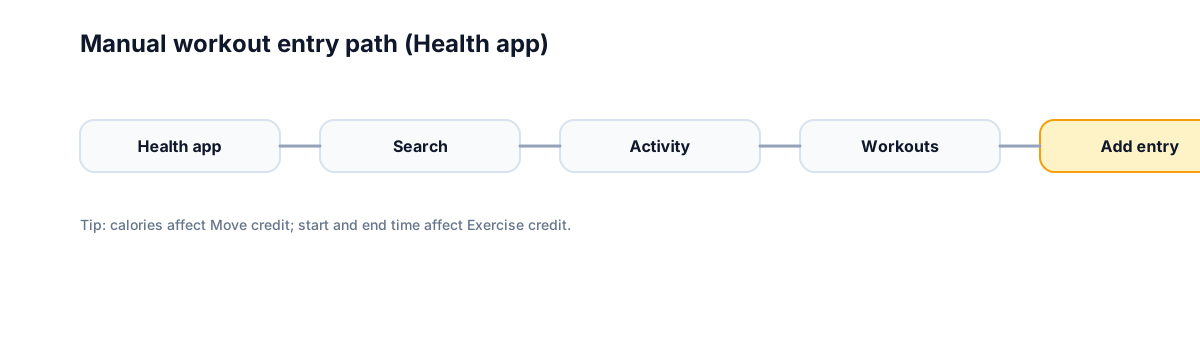
- Tap Search → Activity.
- Tap Workouts → tap Add (top-right).
- Enter workout details:
- For Move credit: add total calories burned
- For Exercise credit: add start + end time
- Tap Done.
Note: labels can vary slightly by iOS version, but the Health → Workouts → Add path is consistent.
Can you add workouts manually?
Yes. Apple Fitness allows manual entries from the iPhone app. Use it for missed tracking, but keep entries realistic so ring progress stays accurate.
Step-by-step: manually add a workout
Add a workout to Apple Fitness manually (Health app)
Use the Health app for reliable manual logging when a workout was missed.
Open Health
Open the Health app on your iPhone.
Find Activity
Tap Search and select Activity.
Add workout
Tap Workouts, then tap Add in the top-right.
Enter details
Add calories for Move credit and start/end time for Exercise credit.
Save
Tap Done to save the entry.
Methods compared
| Method | When to use | Affects rings? |
|---|---|---|
| Apple Watch workout | You recorded it live | Yes, via ring progress |
| Manual add in Health | You forgot to start a workout | Yes, if it updates rings |
| Third-party app sync | You used a connected fitness app | Often, if it syncs to Health |
Ring impact (what typically updates)
| Ring / metric | When it typically updates | Notes |
|---|---|---|
| Move (calories) | Usually | Requires calories value |
| Exercise (minutes) | Often | Needs start/end time; depends on intensity estimation |
| Stand | Unlikely | Usually driven by standing hours, not workouts |
| Competition points | Indirect | Based on ring % progress; manual entry can affect rings if credited |
Create a custom workout (not retroactive logging)
If you want a custom workout type for future sessions, use Fitness → Workout tab → choose a workout type → Goals → Custom/Goals → Add. This sets a goal for upcoming workouts; it does not log past activity.
If you do not see it in Fitness
- Pull down to refresh the Fitness app.
- Check that the workout saved in the Health app.
- Confirm date and time zone are correct.
- Wait a few minutes for Apple Watch sync.
Examples
- Forgot to record a 45-minute run: add a running workout with start/end time and a reasonable calorie estimate. Expect Move and Exercise rings to update if the entry is accepted.
- Logged strength training late: add strength training with the correct duration and calories. Move usually updates; Exercise may update depending on intensity estimation.
Common confusion
Manual workouts update ring totals but do not add GPS routes or heart-rate graphs. That is why your workout history may look sparse even if rings move.
FAQ
Will a manual workout affect competition points?
Yes, if it changes your ring progress for the day.
Can I edit a workout after adding it?
No. You would need to delete it and add it again.
Does Apple Fitness+ auto-add workouts?
If you start a Fitness+ session on your watch, it logs automatically. Manual adds are for missed tracking.
Why this matters
Accurate ring data keeps your weekly rhythm honest. When your history reflects the work you actually did, it is easier to stay motivated and build consistent habits. That consistency helps group challenges feel fair, too.
Want this with groups? Competo supports group leaderboards.
- Weekly leaderboard updates for groups
- Group challenges everyone can join
- Stay consistent without micromanaging scores
Related guides
- Apple Watch competition basics
- Rules behind Apple Watch competitions
- How competition points are calculated
- Activity rings explained in plain English
- What Apple Fitness vs Fitness+ actually means
Not affiliated with Apple.